
- Joined
- Oct 23, 2016
- Messages
- 209
- Reaction score
- 44
- Age
- 55
Wait on 1.7.9!!! Hearing not so good things about it...I didnt tried it yet. Today DJI released the fw 1.7.90. I will try with it first
SM-P550 cihazımdan Tapatalk kullanılarak gönderildi



Wait on 1.7.9!!! Hearing not so good things about it...I didnt tried it yet. Today DJI released the fw 1.7.90. I will try with it first
SM-P550 cihazımdan Tapatalk kullanılarak gönderildi
Have you been able to downgrade?? I have people saying that their log .txt says 1.6.8 after the update.?!. (even when they were already on 1.7.8???.And now won't let them downgrade says "same or older fw Fail"Warning: I've tried to upgrade to 1.7.9 after notification appears on the DJI GO just want to try Magic v5.1 and now can ensure that the mod Magic no longer works on firmware 1.7.9, included if you downgrade back to 1.6.8
Sent from my MI MAX using PhantomPilots mobile app
also yeah guys.. this 1.7.90 can be downgraded only in one condition.. your RC must be in 1.6.8.. otherwise you can not downgrade this beta 1.7.90.. and also today morning one of the DJI agents in DJI forum said that new firmware is coming very soon.. so i think it s good to wait a little bit..

Ok when you power up the controller and the Craft. Do you get all green lights on the controller?
or does one stay red? Just trying to make sure it is linkedDoes it have video? Will it let you Calibrate the IMU? What errors does it tell you? What device are you using iPhone or Android? You can force a compass calibration with the S1 toggle.. Lots of questions

Hey guys. there is a beta firmware called 1.7.90 for P3S. is there anyone who have tried that??? what is results with the signal lost issue?? is there any improvement ????
Thanks
Dilan
Yes and yeehaa this Update works ...but my advise is to format your Sdcard via Pc and then install update make sure when your Dji Go say complete make sure the update light which is on the side of the drones camera plate show green light this takes about 10mims depending on network speed. I got ove 480 mtr flight on the beach with no signal loss. Very pleased has prevolioisly manged about 50 metre.Hey guys. there is a beta firmware called 1.7.90 for P3S. is there anyone who have tried that??? what is results with the signal lost issue?? is there any improvement ????
Thanks
Dilan

Yes and yeehaa this Update works ...but my advise is to format your Sdcard via Pc and then install update make sure when your Dji Go say complete make sure the update light which is on the side of the drones camera plate show green light this takes about 10mims depending on network speed. I got ove 480 mtr flight on the beach with no signal loss. Very pleased has prevolioisly manged about 50 metre.
Sorry this forum does not send me notifications... There are five lights one big four smaller.. your saying you have two red lights?Hi,
Yes I get the green lights on the controller but then two turn red. It wont let me calibrate and i am using a samsung note 4.

Yes I get the green lights on the controller but then two turn red. It wont let me calibrate and i am using a samsung note 4.
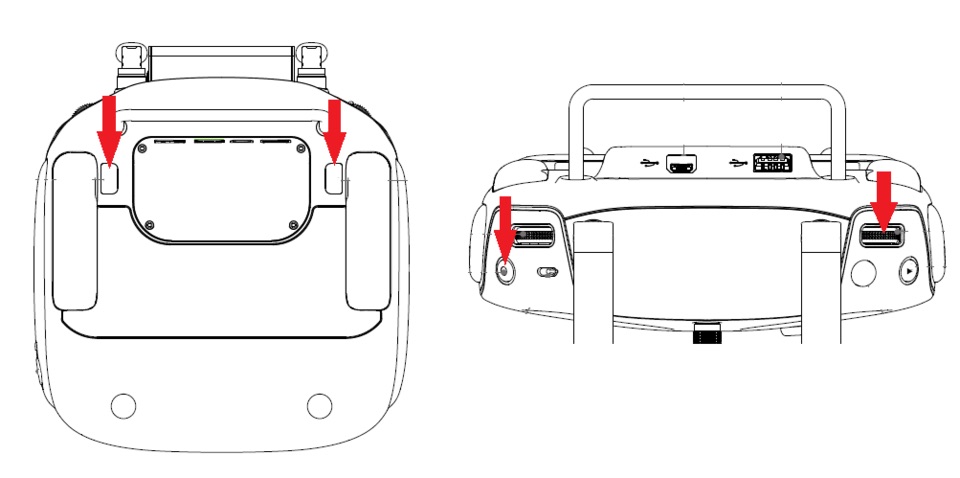
I believe She has a P3S... She will need to toggle S2 and press the link button on craft...Hi Nada and welcome to the forum - you have come to the right place to find answers to any issues or to obtain any tips on just flying n filming.
Sounds like your controller is either not linked/bound to the P3 or is having issues with same. Below is info on doing a "hard reset" of the remote.
If you still have issues with this - follow this link and I am sure you will find the solution DJI Phantom Accessories & Tips - Phantom Help the guy who runs that site is also a member here and a wealth of knowledge for assisting with pretty much anything you need.
Best of luck and safe flying n filming.
Hard Reset for Controller
- If normal bind procedure doesn’t work, here are the steps to do a hard reset on your remote control:
- Power Cycle your remote control
- Push and hold all of the following buttons at once (see image below)
- C1
- C2
- The Video Record Button
- The Camera Settings Dial


Me too, with the DBS. The new FW did improve my distance by over 500m.Had this update come through too, not sure whether to update it or not. I have the DBS mod and have got it working well, so I might not tempt fate.
So just renaming the fw is enough? Because the last fw that worked for me is 1.4.60. I found the bin file but cannot downgrade before.Do we need to downgrade step by step or can we go directly from 1.7.90 to 1.4.60?I think Nada just needs to get the RC linked to the P3S. 7. How do I link the remote controller? Works for me every time, although I usually just stick a paper-clip into the reset slot on the bird after powering it and the RC up. Usually links in a couple seconds.
Re: the OP; I got the firmware upgrade to 1.7.90 notice on my iPad when I launched DJI Go App 3.1.0 and powered up the P3S and RC, and skipped the upgrade. I'm at 1.6.8 and the bird is stable and gets range beyond 1k ft. in the city without signal loss. I did get a replacement bird / RC from DJI recently after an RMA of the original P3S, which I'd bought in late March 2016; it had stopped going further than 200 ft. The replacement bird is about 6 months newer and seems to be way more stable.
During that RMA process I did downgrade the FW to several previous revisions while troubleshooting, and you can absolutely downgrade the FW of the P3S to any level, as long as you have the .bin on the MicroSD card at the root of the drive. I've got the following versions as a result of that process:
P3C_FW_V01.03.0050.bin
P3C_FW_V01.04.0060.bin
P3C_FW_V01.05.0070.bin
P3C_FW_V01.07.0082.bin
P3C_FW_V01.06.0080.bin
If anyone needs one, PM me and I'll send it your way. I remember they were tough to find, but I've tested them, and they all work.
Just need to copy the relevant .bin file to the root of the MicroSD card and rename it P3C_FW_V99.99.9999.bin.
I'm leaving 1.7.90 alone, for now. I don't get that the QA on P3S firmware at DJI is as rigorous as it is on the P4, and Pro / Advanced versions.
If it ain't broke...
Yep; those are the ones, Rod. Always good to keep a local copy. ;-)@Van,
"I remember they were tough to find"
These are them, correct?
DJI Phantom Accessories & Tips - Phantom Help
Rod






We use essential cookies to make this site work, and optional cookies to enhance your experience.

