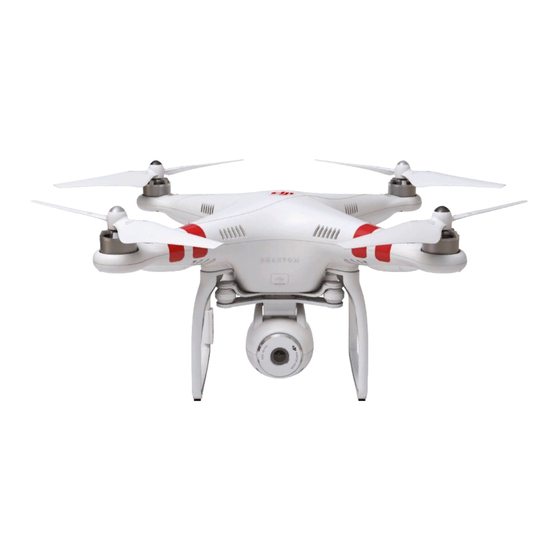
How to make a firmeware update for Phantom 3 Standard that cannot connect via go app

Joined
Jan 17, 2026
Messages
6
Reaction score
10
Age
44
DJI dropped software support for the Phantom 3 a while ago.

I have still this drone and I would like to continue using it. I did not use it four a couple of years and now I am unable to connect or find a software capable of.

Here is the situation in detail: The drone is still functioning. It connects to the RC and you can fly it without connection to a cellphone.

IF you want to connect through an applicaiton like DJI Go or Maven or similar, it is not capable of establishing a connection. It seems like the old firmeware is based on some wifi communication protocol, that is not compatible e.g. with newer iphones.

I therefore tried to also search for a desktop software to connect. But also no success. The website does not offer any software for this model anymore. IT basically tells me that I should update the firmeware of my DJI with my cellphone which is impossible.

So I really dont know what to do. I would love to keep using the drone. It cost me more then 1000 bucks back then. DJI simply dropping software support and not (at least) open-sourcing their old software so people can still use the proprietary protocols and build upon it is frankly very frustrating. Any help would be appreciated.
 
  • Like
Reactions: RodPad and BillyN
My P3's Standards fly great using DJI Go app version 3.1.81......and an ipad10 using iOS 26 .

It would help if you listed the phone type and software version.....as well as what DJI GoApp version you are trying to use. Plus, what trouble are you having trying to connect to the drones wifi on your device.?

Most importantly....do NOT update the drones firmware.....since it flies fine. Seems like the only issue you are having is connecting to the GoApp.
 
I am using the same software specs as you but without success. Ipad or Iphone with iOS 26 and Dji Go 3.1.81

For me, the "camera" symbol just does not appear when connected via wifi in the app.

Is there any way to check which firmeware is running? Can you check yours?

According to DJI, firmware should be update with the app, but the app does not work for me.

The latest (and only) available firmeware is
Phantom 3 Standard Firmware 01.09.0200
2017-06-29

IT can be downloaded as a zip, but since I cannot access the drone itself via USB (or the DJI Go App) I have no idea how to install it.

As said, the rest is just fine. RC connects to drone, drone can be flown without cellphone connection.
 
My drone firmware version is from way back in 2015........1.5.07. I DO NOT update firmware. Updates do more harm than good.

Since the GoApp seems to be the issue, I suggest you delete the GoApp from your device, and then reinstall. The previous version may have been corrupted during initial download.

Once successfully downloaded and installed, do a full restart on your R/C, drone and device. The device should see the r/c WiFi signal and connect.
 
DJI dropped software support for the Phantom 3 a while ago.
Many years back
I have still this drone and I would like to continue using it. I did not use it four a couple of years and now I am unable to connect or find a software capable of.
The DJI GO app is used for the standard
Here is the situation in detail: The drone is still functioning. It connects to the RC and you can fly it without connection to a cellphone.

Well thats good news, as it shows that in essence that the drone is functioning fine
IF you want to connect through an applicaiton like DJI Go or Maven or similar, it is not capable of establishing a connection. It seems like the old firmeware is based on some wifi communication protocol, that is not compatible e.g. with newer iphones.

I've read many posts about issues with IOS devices, the preferred phone type is android.
I therefore tried to also search for a desktop software to connect. But also no success. The website does not offer any software for this model anymore. IT basically tells me that I should update the firmeware of my DJI with my cellphone which is impossible.
Theres never been any desktop software as such
. Any help would be appreciated.

Well here we are offering help, go find an old android phone install the app on it, then connect to the drones wifi, if you cant let us know what is happening ( its phantom_XXXXX), if you can let us know
 
My P3's Standards fly great using DJI Go app version 3.1.81......and an ipad10 using iOS 26 .

It would help if you listed the phone type and software version.....as well as what DJI GoApp version you are trying to use. Plus, what trouble are you having trying to connect to the drones wifi on your device.?

Most importantly....do NOT update the drones firmware.....since it flies fine. Seems like the only issue you are having is connecting to the GoApp.
You had to update the Djigo app in order to work with your iPad right?
 
  • Like
Reactions: RodPad
You had to update the Djigo app in order to work with your iPad right?
Actually I was waiting until it was proven that the GoApp update to 3.1.81 worked with iOS26 before I did anything. But yes, I updated the GoApp.

Another member made a thread concerning the DJIGo app being updated to 3.1.81 that made the app and iOS26 play nice together. I'd link that post, but can't remember who started the thread.........(old fart syndrome again)......

Edit: Found the thread, it was YOUR thread from October 14, 2025.

Crazy, huh?........😂😂😂
 
Actually I was waiting until it was proven that the GoApp update to 3.1.81 worked with iOS26 before I did anything. But yes, I updated the GoApp.

Another member made a thread concerning the DJIGo app being updated to 3.1.81 that made the app and iOS26 play nice together. I'd link that post, but can't remember who started the thread.........(old fart syndrome again)......

Edit: Found the thread, it was YOUR thread from October 14, 2025.

Crazy, huh?........😂😂😂
That's crazy and meant you read my post
 
Update: I got myself now an old Android phone (Oneplus 7). I downgraded the OS to Android 9 which was a version that supposedly supports the old DJI Go Version still well. I downloaded the apk form the official DJI website. It installs DJI Go v.3.1.83....

Still no success.

Camera View does not show up.

So I tried to remove another possible error source: link between RC and Drone iteself.

I therefore followed the official documentation:


-> power on the camera and range extender, 10s later press the Rebind Button on Range Extender with a cuspidal object, 5s later the SYSTEM LED is off.
-> wait patiently, the WiFi system of range extender will be restored about 25s later, and the SYSTEM LED will blink green


Result: The system button blinks solid green but after some 5-10 seconds turns off, and then after 5-10 seconds on again... so you could also say its a very slow blinking. But also this is quite inconsistent. Sometimes the system green appears or disappears for even longer times.

The drone, btw. blinks slow yellow. I guess this is the case because I am indoors and the drone does not catch a GPS. But I would guess link everything would not require me to have GPS and be outside.
 
Last edited:
  • Like
Reactions: RodPad
So your 'new' device is not seeing any WiFi signal? To double check, round up friends and family with their devices (phones, iPads, androids) and use their WiFi connections search to see if anybody 's device picks up a WiFi signal from the R/C. If nobody is seeing the DJI WiFi signal from the remote controller, further testing may be necessary .

Key Details regarding the Wi-Fi Module & Remote:
  • Purpose: The remote creates a Wi-Fi hotspot to which your phone or tablet connects to receive the camera feed via the DJI GO app.
  • Frequency: Operates on 5.8GHz.
  • Reset Procedure: To reset the Wi-Fi network name (SSID) and password to default, turn on the controller, turn the gimbal dial to the far right, and toggle the S2 switch back and forth at least three times.
  • Range & Connection: The controller has a built-in rechargeable battery that lasts up to 3 hours. If connection fails, the drone and controller can be re-linked.
Common Troubleshooting:
  • If the video feed is laggy or disconnected, ensure your mobile device is connected to the Phantom's Wi-Fi network and not another network.
  • The default password, if not changed, is always 12341234.
 
Last edited:
  • Like
Reactions: RodPad
I tried it with several phones. The WiFi is visible. I can connect. I do not even need a password. But there is no "camera view" on the DJI app. I. took two fotos that summarize the situation. Also I dont think I have a gimbal dial...or at least I dont know what it is..my RC is quite basic (see fotos).


IMG_5588.jpg

IMG_5589.jpg
 
  • Like
Reactions: RodPad
That explains a lot. That is a Phantom 2 Standard.....not a Phantom 3.

To get a camera feed on a
Phantom 2 Standard
(or Vision/Vision+), you must connect your mobile device to the drone's internal Wi-Fi network through a range extender and use the legacy DJI Vision app.

Step-by-Step Connection Guide
  1. Download the App: Search for and install the DJI Vision app (not DJI Fly or DJI GO) on your smartphone.
  2. Power On Equipment:
    • Turn on the Range Extender (the small white box on your remote) and wait for a green light.
    • Turn on the Remote Controller.
    • Turn on the
      Phantom 2
      (press the battery button once, then press and hold for two seconds).
  3. Connect Wi-Fi:
    • Open your phone's Wi-Fi settings.
    • Wait about 30 seconds for a network named "Phantom_1XXXXX" or similar to appear.
    • Select this network to connect.
  4. Launch App: Open the DJI Vision app. Once the connection indicator on the home screen turns green, tap the camera icon to view the live feed.

Troubleshooting Common Issues
  • Black Screen: If you are connected but see a black screen, ensure the camera's physical cable is firmly plugged into the gimbal.
  • App Compatibility: Because the
    Phantom 2
    is a legacy model, newer versions of Android or iOS may struggle to run the old DJI Vision app. You may need an older tablet or smartphone to maintain a stable connection.
  • Internal Wi-Fi Module: A common hardware failure in these older units is the internal Wi-Fi module overheating, which results in "No Video" even when the app is connected.
 
Last edited:
  • Like
Reactions: RodPad
ohhhh. big fail from my side. Visually it just looks like the phantom 3.

So with the Vision App I also have no luck in connecting. I can connect to the wifi but somehow the app does not recognize it or is somehow unable to get the stream. I tried it with a new iphone and the old Android 9 phone. no luck so far. Does it make sense to try it with even more cellphones or is this likely a hardware defect? is there any sparepart I could change easily if so...?

IMG_5593.jpg
IMG_5592.PNG
IMG_5591.PNG
 
To fix connection issues between the Phantom 2 Vision and the Android app, ensure you are using an older Android device (Android 5.0–6.0) as modern phones often struggle with the app. Connect your phone directly to the Range Extender Wi-Fi, then launch the DJI Vision app. Common fixes include resetting the Wi-Fi extender, re-binding the camera, or replacing the likely faulty internal Wi-Fi module.
Key Troubleshooting Steps:
  • Check Phone Compatibility: The app is obsolete and often fails on newer Android versions. Use a phone from around 2016 (Android 5.0–6.0) for the best results.
  • Bind Camera to Extender: If the app connects to Wi-Fi but has no video, you may need to re-bind the camera to the range extender using the camera's MAC address.
  • Reset Range Extender: Turn on the extender, locate the small hole on the side, and press it until the system light goes out and restarts.
  • Check Wi-Fi Module: The internal Wi-Fi module in the Phantom 2 is prone to overheating and failure. If it is dead, the app will not receive a signal even if the extender is working.
  • Use Proper Startup Sequence: Turn on the transmitter, then the range extender, then the phantom. Wait 30 seconds for the Wi-Fi to stabilize, connect your phone to the "Phantom_XXXXXX" network, and then open the app.
  • Toggle Wi-Fi: Turn your phone's Wi-Fi off and on again if the network does not appear.
If you are still unable to get a live view, the issue is likely a failed Wi-Fi module inside the drone, a common issue with this older model.
 
  • Like
Reactions: RodPad
  • Like
Reactions: captainmilehigh
woh hang on thats the phantom 2 vision or vision plus not the phantom 3 standard, its a totally different quad, take a look at my webpage for phantom 2 related issues


Members online

Forum statistics

Threads
143,857
Messages
1,473,718
Members
105,950
Latest member
YvetteMarl