


Two flyaways happened when switching to Active Track, need help deciphering logs

makneyse

Approved Vendor
Joined
Feb 6, 2018
Messages
63
Reaction score
32
Age
48
Hi All,

I recently had a full day of flying but at one point in the day, the drone flew away after switching to Active Track (this happened twice). The first time it took off going forward and the second time (which I recorded video) took off flying backwards. Both times I switched out of GPS mode and was able to regain control. I used Active Track both before and after this incident elsewhere on the same property and didn't have any issues. If anyone can help decipher the flight log to shed light on what happened, I'd appreciate it.

Phantom 4 Pro V2.0
All firmware is up to date.

Here's the flight log:
Right click the three dots to download it and then upload it here:
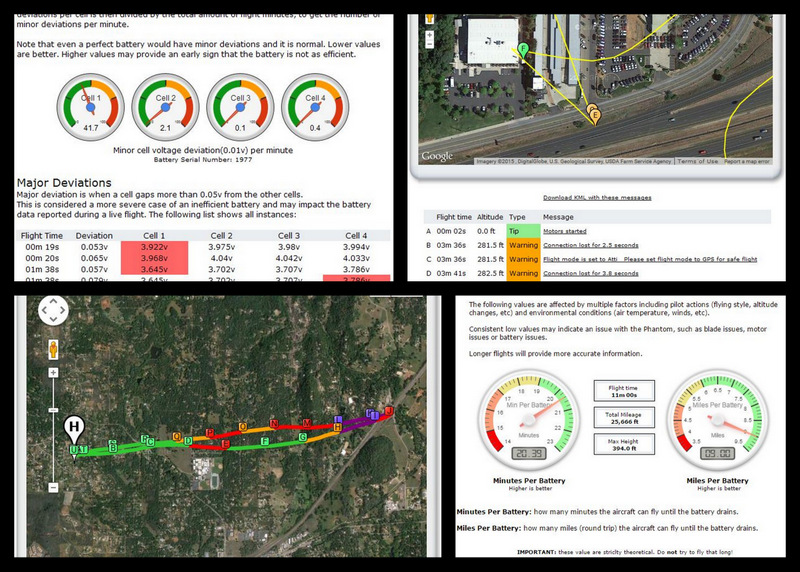
And here's a video of the second flyaway (which happened seconds after the 1st one):
To view this content we will need your consent to set third party cookies.
For more detailed information, see our cookies page.

I had just switched to Active Track and drew a box around House of Play. A second later, it flew away backwards. I then switched it to Atti Mode and regained control. I had launched from a shopping center parking lot and I can't imagine the issue was caused by anything underground. Both times it didn't happen until I drew a box around what I wanted the Active Track to follow.

Thanks for the help!
 
  • Like
Reactions: RodPad
Adding, this link
This what I did.

This link has a lot.of info.

Many members here can give some info.
@Meta4
@msinger
@sar104
@Oso

Rod ..
 
If anyone can help decipher the flight log to shed light on what happened, I'd appreciate it.
Sorry ... the data and your video doesn't have any clues to help.
I had just switched to Active Track and drew a box around House of Play.
A second later, it flew away backwards.
?? House of Play?
Active track is wanting a moving target that it can recognise, like a person, a car etc.


I then switched it to Atti Mode and regained control. I had launched from a shopping center parking lot and I can't imagine the issue was caused by anything underground. Both times it didn't happen until I drew a box around what I wanted the Active Track to follow.
What were you wanting the drone to follow?
I'm (only) guessing that Active Track was lost without a target.

btw, nothing underground would (or could) have had any effect.
I don't think your drone "flew away".
What you observed was just Active Track having trouble because you didn't designate a proper target.
In any case, switching to Atti Mode and back again is a quick and easy way to disengage any automated flight mode.
That the drone performed normally when you did is an indication that there was no external influence on the drone.
 
  • Like
Reactions: makneyse and RodPad
@Meta4,
Did you get the data from Gdrive or other?
Does the data match the video?

@makneyse
Have you been back to this thread yet?

Rod ..
 
Hi All,

Thank you for the replies. I actually use Active Track as one of my options for flying circles around stationary objects. Especially when I can't or don't want to fly over the center of an object as the POI route requires. Active Track works well as long as the drone continues to see the front of the object. Once it passes the side and sees something different (like with a scoreboard in a baseball outfield), then it loses the subject and stops.
The other time I had a major flyaway (and crash) was in a downtown setting where something (most likely underground) caused the interference. If I recall correctly, I had landed for a battery change and got a compass error. When it started back up with a new battery the error went away so I couldn't calibrate. Then I only had 3 seconds before it crashed into a building. After the analyzation of that flight, I learned switching out of GPS mode was what I should have done since the sticks weren't responding the way they normally do.

Back to the current issue, @Meta4 you bring up an interesting angle that it wasn't a flyaway but something squirrelly with Active Track. I didn't think to press the pause button when it happened but I bet that would have told us if Active Track was the culprit. In the video you can see that as soon as I drew the box around the storefront, the camera centered up on House of Play and then the drone "flew away". Normally it hovers until the object moves or I tell it to fly circles around it (and at what speed and direction).

As mentioned, I had flown Active Track both earlier and later in the day focused on other storefronts and it flew flawlessly, giving me that nice arcing shot, even with scattered palm trees in the foreground (luckily, not causing it to lose its subject).

I also forgot to mention that the flyaways happened at 00:45 and 02:10 but you can see that pretty easily from the logs.

And side note: I got the logs from my CrystalSky monitor. I had plugged the drone into my computer and tried to get them via DJI Assistant 2 but had a lot of issues and I ended up getting a zip file of 7 logs that had different dates than the day of the incident. The file is too big for the Airdata link and I'm not getting it to work on the Phantom Help link either. I've uploaded it to that same Google Drive folder in case someone has a way to see if those log files even pertain to this.
 
Last edited:
  • Like
Reactions: RodPad

Members online

No members online now.

Forum statistics

Threads
143,857
Messages
1,473,707
Members
105,948
Latest member
hcashmore11


