Hi everyone,
I’m new to the FPV world and I’m trying to use my DJI Phantom 3 Standard remote to practice on a simulator before investing in a full FPV drone.
I’ve been spending hours on the internet trying to make it work, but I'm stuck. Could it work ?
Here is my setup:
Does anyone have experience with getting this specific legacy DJI remote to work on a Windows ARM virtual machine or MAC directly?
Is there a specific driver or a workaround (like a Serial-to-HID bridge) that actually works on this architecture?
Any help would be greatly appreciated! Thanks in advance.
I’m new to the FPV world and I’m trying to use my DJI Phantom 3 Standard remote to practice on a simulator before investing in a full FPV drone.
I’ve been spending hours on the internet trying to make it work, but I'm stuck. Could it work ?
Here is my setup:
- Computer: Mac (Apple Silicon) running Windows 11 ARM via VMware Fusion.
- Hardware: DJI Phantom 3 Standard Remote connected via USB.
- When I open DJI RC System Assistant_1.2, nothing happens. The controller isn't detected at all.
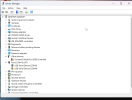
- In the Windows Device Manager, the controller often shows up as an "Unknown Device" or "USB Serial Controller" with a yellow triangle.
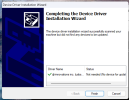
- I suspect I don't have the correct drivers, but every time I try to install the DJI Virtual COM driver or vJoy, the installation fails or Windows blocks it (even when disabling signature enforcement).
Does anyone have experience with getting this specific legacy DJI remote to work on a Windows ARM virtual machine or MAC directly?
Is there a specific driver or a workaround (like a Serial-to-HID bridge) that actually works on this architecture?
Any help would be greatly appreciated! Thanks in advance.