Phantom 3 standard still thinks there's geofencing

Joined
Nov 24, 2018
Messages
59
Reaction score
55
Age
72
Location
Fort Worth/Benbrook, Texas
Finally got a new camera on my P3S working. But now it won't let me start the motors manually because it still thinks I'm a warning zone. The P3S will take off and hover when I use the take-off button in the DJIGo app. It will hover at about 4 feet and then land when I used the app's landing button. All this is happening without any input response from the sticks on the controller.

Since DJI did away with geofencing, how do I get my P3S to ignore the warning zone? Are there other Phantom 3 owners observing this issue. Tried to search the forums but didn't get any results.

Should I downgrade the firmware? If so, to what version. Currently 1.9.20 is installed. Would using Litchi work any different?

If I downgrade the firmware do I need to downgrade the controller??

My Mavic Air and Mini 3 work just fine.

Thanks in advance.
 
Last edited:
Finally got a new camera on my P3S working. But now it won't let me start the motors manually because it still thinks I'm a warning zone. The P3S will take off and hover when I use the take-off button in the DJIGo app. It will hover at about 4 feet and then land when I used the app's landing button. All this is happening without any input response from the sticks on the controller.

Since DJI did away with geofencing, how do I get my P3S to ignore the warning zone? Are there other Phantom 3 owners observing this issue. Tried to search the forums but didn't get any results.

Should I downgrade the firmware? If so, to what version. Currently 1.9.20 is installed. Would using Litchi work any different?

If I downgrade the firmware do I need to downgrade the controller??

My Mavic Air and Mini 3 work just fine.

Thanks in advance.
Have you updated the "Fly Safe" database in the GoApp? That should eliminate any remnants of Geofencing.
 
I would advise NOT messing with the firmware.

Does the GoApp say 'Safe to Fly' with any airspace warning messages?

Maybe delete the GoApp and reinstall on your device. Be sure to update the fly safe database when app starts if it has that option.

Change location to a known safe flying area.
 
  • Like
Reactions: Daniel NZDF
I would advise NOT messing with the firmware.

Does the GoApp say 'Safe to Fly' with any airspace warning messages?

Maybe delete the GoApp and reinstall on your device. Be sure to update the fly safe database when app starts if it has that option.

Change location to a known safe flying area.
thanks for replying again. Changing firmware is my last option. If I remember correctly there is a warning message. I'll check to see what it says (again). Forth Worth Thunderbirds flying field is a FRIA. Might go try there.

If that doesn't work I'll try reinstalling the app. I think I'll try connecting to the controller and internet at the same time and see if that allows me to update the FlySafe database.
 
  • Like
Reactions: Daniel NZDF
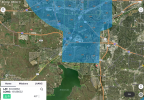
I don't see any airspace restriction in the Benbrook area, other than the normal 400' maximum altitude limit due to DFW class B airspace. (Blue)

(I use Aloft Flight Control for all my LAANC FAA clearances in restricted or controlled airspace.)
 

Attachments

  • IMG_8125.png
    IMG_8125.png
    7.3 MB · Views: 94
  • Like
Reactions: Daniel NZDF

Members online

No members online now.

Forum statistics

Threads
143,857
Messages
1,473,707
Members
105,948
Latest member
hcashmore11