Phantom 3 pro - help needed

Joined
Aug 6, 2025
Messages
2
Reaction score
0
Age
24
Just recently got a new battery and charged up my phantom 3 professional and my DJI go app will not recognize my phantom. My remote will not control the phantom and nothing will pull up on the app, just the Home Screen, any recommendations?
 
Just recently got a new battery and charged up my phantom 3 professional and my DJI go app will not recognize my phantom. My remote will not control the phantom and nothing will pull up on the app, just the Home Screen, any recommendations?
Need a bit more info to troubleshoot the issue:

GoApp version? Requires android 4.1.2 or later, or IOS 8.0 or later.

USB cable correct? High quality Data transfer cable, not a charging cable.

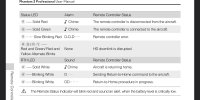
Aircraft and R/C linked? Status lights correct?

Aircraft indicator lights (arms) colors and status..(blinking,etc)

R/C status light color...red/ green?

The above information will help members diagnose the issues and offer solutions. Any other information you can provide will help.

...and, Welcome to the Phantom Pilots Forum.
 
Yes app is updated

Running IOS 18.2

I’ve tried multiple charging cables, including standard apple cables which I’m sure are data transfer

Aircraft and RC don’t seem to be connected because camera controls don’t work. The flight lights work but status light on him or blinks red


RC controller lights are just standard

It seems the main problem is that my remote control is not recognizing my phone, and I’ve also tried my friends phone. Or that the drone and remote aren’t pairing correctly
 
AC has an aircraft status diode, and Radio Link status diode.
RC has a diode which tells link status as well.
Status diodes are identified and explained, of course, in the manual.

You can control the AC without the app, so one way forward would be to focus on the RC and AC.
But if you consider mobile device link more important, it is possible to start with this one as well - connection to RC doesn't require the aircraft, it will show "Aircraft disconnected" but you should be able to see RC status, ie. stick positions in options. First, rule out the cable and the mobile device config being the issue.

 
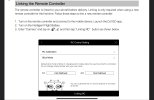
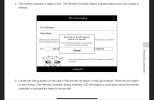
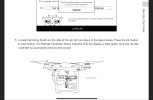
Linking R/C and Aircraft :


*****You can download the manual @quaddamage referred to from 'Phantomhelp.com'. It is free to download. Just be sure to select the correct Drone model from the dropdown menu.
 

Attachments

  • IMG_7631.jpeg
    IMG_7631.jpeg
    347.6 KB · Views: 101
  • IMG_7632.jpeg
    IMG_7632.jpeg
    351.2 KB · Views: 118
  • IMG_7633.jpeg
    IMG_7633.jpeg
    350.1 KB · Views: 93
  • IMG_7634.jpeg
    IMG_7634.jpeg
    331.7 KB · Views: 116

Members online

Forum statistics

Threads
143,868
Messages
1,473,778
Members
105,969
Latest member
magicgat