- Joined
- Jan 24, 2026
- Messages
- 4
- Reaction score
- 5
- Age
- 28
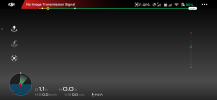
Hey Guys, so I upgraded to a newer drone and left my phantom 3 standard in storage for (an excessively long time) my batteries are all bad, however I borrowed one from a friend to make sure my drone works, it does, I can fly it, take off everything is perfect HOWEVER the image transmission error pops up I don’t even see the white circle to take pictures (I’m guessing since the image don’t work that button don’t show up either) I go to the three dots on top right (this is from DJI Go app up to date on a IPhone 13 max everything seems to read fine except the very bottom it says gimbal status *Gimbal Disconnected*
I’ve been looking up videos one claimed remove sd card restart drone then see if it shows an image (it didn’t) another said re link controller which didn’t work either)
I’m convinced maybe leaving it (in a carrying case all this time) could’ve possibly still destroyed the ribbon cable
Trying to see if they may be it or if anybody knows other methods I may not have tried to see if I can get image to work) I can’t change transmission setting or nothing like I’ve seen some people say idk if I have to get camera part to work first or what but I don’t see anything that says something about image transmission settings, I’ll buy a ribbon cable if that’s it and just have someone who’s more comfortable with that kinda stuff replace it if that’s the problem, but again.. if there’s other things to try somebody let me know so I can try to get it working, thank you! Drone has NEVER been crashed so I know that didn’t cause it to mess up (only I have been the one to fly it and since I’ve owned this one I have never wrecked it and I purchased it new
I’ve been looking up videos one claimed remove sd card restart drone then see if it shows an image (it didn’t) another said re link controller which didn’t work either)
I’m convinced maybe leaving it (in a carrying case all this time) could’ve possibly still destroyed the ribbon cable
Trying to see if they may be it or if anybody knows other methods I may not have tried to see if I can get image to work) I can’t change transmission setting or nothing like I’ve seen some people say idk if I have to get camera part to work first or what but I don’t see anything that says something about image transmission settings, I’ll buy a ribbon cable if that’s it and just have someone who’s more comfortable with that kinda stuff replace it if that’s the problem, but again.. if there’s other things to try somebody let me know so I can try to get it working, thank you! Drone has NEVER been crashed so I know that didn’t cause it to mess up (only I have been the one to fly it and since I’ve owned this one I have never wrecked it and I purchased it new