Phantom 3 Pro Issues / Introduction

Joined
Sep 5, 2025
Messages
5
Reaction score
9
Age
25
Hello Everyone! Quick introduction with a problem I have encountered with some Phantom Pro 3's I recently purchased second hand.

I own a total of 4 Phantom 3's now, two standards and two pros, all with their own unique issues.

The one I am currently working on had a not so soft landing according to the previous owner, and now only sometimes shows the camera feed on my screen. (I am using DJI Go for right now, although Litchi had the same issues when I used it) I double checked the gimbal, and it appears fine, would this potentially be an issue with the connecting wires between the bird and the camera? I always have camera feed when I prepare to take off, but once I take flight, the camera feed disappears, once the drone lands, the camera feed will sometimes return.

I am a little lost on this one and would love for a bit of help, I do have alternative cables / parts for the drone that I can quickly substitute, just not sure where to start.

Thanks a lot everyone!
 
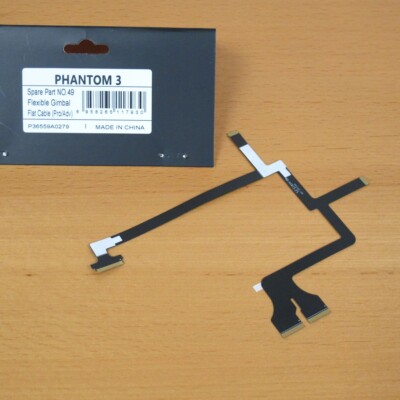
Sounds like the dreaded ribbon cable is damaged. I'd start there, and replace it with a 100% DJI OEM ribbon cable...........NOT a cheap 3rd party knockoff cable. They rarely work correctly.

Not sure which drone you're working on @dougie, but DJI OEM part numbers are:
DJI Phantom 3 Standard is part number # 85.
DJI Phantom 3 Pro/Adv is part number # 49.

It will come in a smoke colored bag with DJI logo and info. They may be hard to find, since DJI no longer supports the Phantom series.
 
Sounds like the dreaded ribbon cable is damaged. I'd start there, and replace it with a 100% DJI OEM ribbon cable...........NOT a cheap 3rd party knockoff cable. They rarely work correctly.

Not sure which drone you're working on @dougie, but DJI OEM part numbers are:
DJI Phantom 3 Standard is part number # 85.
DJI Phantom 3 Pro/Adv is part number # 49.

It will come in a smoke colored bag with DJI logo and info. They may be hard to find, since DJI no longer supports the Phantom series.
Okay, thank you so much, I'll start with this! And I forgot to mention, this is the Phantom 3 Pro that I am starting with. I also forgot to add that I able to take and store video/pictures, just unable to see anything on the camera feed.
 
Okay, thank you so much, I'll start with this! And I forgot to mention, this is the Phantom 3 Pro that I am starting with. I also forgot to add that I able to take and store video/pictures, just unable to see anything on the camera feed.
(...before you go tearing things apart.............)

A Phantom 3 Professional that does not send a live camera feed could have software problems with the DJI GO app, a corrupted SD card, or hardware issues like a damaged gimbal ribbon cable.

App and device issues
  • Restart everything. Power off the drone, remote controller, and mobile device, then turn them back on in sequence.
  • Restart the app. Completely close and reopen the DJI GO app. You can also try uninstalling and reinstalling it from the DJI website to ensure you have a clean installation.
  • Check the cables and USB ports. Ensure the cable connecting your mobile device to the remote controller is working properly and securely connected at both ends. Test a different cable and a different USB port if possible.
  • Use a different device. Try connecting the drone to a different mobile device. This can help rule out a problem with your phone or tablet.
  • Adjust app settings. In the DJI GO app's image transmission settings, try manually switching the Wi-Fi channel instead of using the "Auto" mode. For iOS devices, toggle the Hardware Decoding setting.
SD card

  • Format the SD card. A corrupted memory card can interfere with the live feed. Format the SD card directly within the DJI GO app's settings.
Hardware problems
  • Check the gimbal ribbon cable. This fragile cable, which runs from the camera through the gimbal to the mainboard, is often the culprit for video transmission problems. Check the cable and its connection points for any visible signs of damage, fraying, or loose connections.
    • Warning: This involves opening the drone's shell and should only be performed by those comfortable with electronics.
  • Test the camera. If the drone can take pictures and record video that you can access from the SD card, the camera sensor is likely working. However, the issue could still be with the video transmission component of the gimbal or a communication board.
  • Check for connection issues. Ensure the connections between the gimbal and the aircraft's main body are secure. Try disconnecting and reconnecting them carefully.
 
Hi,
I have a Phantom 3 Pro 2015 (USB to controller rather than WiFi) who has been on a crash which caused the breaking of the Gimbal and the flat ribbon cable.

Controller GL300B
Aircraft: W323A (PHANTOM 3 PRO 2015)

I replaced both the Gimbal foot and the ribbon cable of the Camera Gimbal.

I can take pictures/videos using the respective buttons on the phone's app or from the Controller Phisical buttons, and save them on the SD Card, but there is no camera feed on the phone app. In other words, the camera works and motherboard too, as it can gather the pictures/ videos taken and save them into the SD Card (which is new and I formatted it from the DJI GO app). I can access the content of the SD Card from a computer by connecting the microUSB Cable to the Gimbal and the PC. The pictures and videos gets recorded and stored on the SD card correctly.

The motor works too, I've successfully run the Gimbal calibration from app.
The small LED above the camera is Green. The Rear Lights if the Drone are flashing Green while the Front one are solid Red indicating the nose of the Aircraft.

I've tried three Android phones (developer mode and Debug USB both enabled), and with different versions of the DJI GO app, still no Camera feed on the DJI GO app, although it the Phone is correctly connected to the Controller and I can see and manage the Aircraft from the app, in fact it does shows "Ready to Go". I can even start three drone engines and fly it.

What could it be the reason why I cannot get and camera feed on the DJI GO app?

Thanks
 
Sounds like the dreaded ribbon cable is damaged. I'd start there, and replace it with a 100% DJI OEM ribbon cable...........NOT a cheap 3rd party knockoff cable. They rarely work correctly.

Not sure which drone you're working on @dougie, but DJI OEM part numbers are:
DJI Phantom 3 Standard is part number # 85.
DJI Phantom 3 Pro/Adv is part number # 49.

It will come in a smoke colored bag with DJI logo and info. They may be hard to find, since DJI no longer supports the Phantom series.
 
Thanks for replying to my post.
Ok, I will consider buying the original cable from ebay at the link you provided.
In the meantime, can you give me some clue on which portion/connection of the ribbon cable I should double check for potential electrical connection issue? Which of the boards takes care of the transmission of the camera from the Aircraft to the comtroller in the Phantom 3 Pro 2015?

Thanks and regards,
Salvo
 
Last edited by a moderator:
  • Like
Reactions: RodPad
(...before you go tearing things apart.............)

A Phantom 3 Professional that does not send a live camera feed could have software problems with the DJI GO app, a corrupted SD card, or hardware issues like a damaged gimbal ribbon cable.

App and device issues
  • Restart everything. Power off the drone, remote controller, and mobile device, then turn them back on in sequence.
  • Restart the app. Completely close and reopen the DJI GO app. You can also try uninstalling and reinstalling it from the DJI website to ensure you have a clean installation.
  • Check the cables and USB ports. Ensure the cable connecting your mobile device to the remote controller is working properly and securely connected at both ends. Test a different cable and a different USB port if possible.
  • Use a different device. Try connecting the drone to a different mobile device. This can help rule out a problem with your phone or tablet.
  • Adjust app settings. In the DJI GO app's image transmission settings, try manually switching the Wi-Fi channel instead of using the "Auto" mode. For iOS devices, toggle the Hardware Decoding setting.
SD card

  • Format the SD card. A corrupted memory card can interfere with the live feed. Format the SD card directly within the DJI GO app's settings.
Hardware problems
  • Check the gimbal ribbon cable.This fragile cable, which runs from the camera through the gimbal to the mainboard, is often the culprit for video transmission problems. Check the cable and its connection points for any visible signs of damage, fraying, or loose connections.
    • Warning: This involves opening the drone's shell and should only be performed by those comfortable with electronics.
  • Test the camera. If the drone can take pictures and record video that you can access from the SD card, the camera sensor is likely working. However, the issue could still be with the video transmission component of the gimbal or a communication board.
  • Check for connection issues. Ensure the connections between the gimbal and the aircraft's main body are secure. Try disconnecting and reconnecting them carefully.
Okay, I have gone through all the steps up to the Hardware Problem sections and it appears that none of them have fixed the issue. I believe my best bet now is to replace the dreaded ribbon cable, as you stated earlier. I tried disconnecting and reconnecting the cables that go from the gimbal to the aircraft, that did not appear to fix the problem either. Thanks again for everything so far, this has been incredibly helpful!
 
Okay, I have gone through all the steps up to the Hardware Problem sections and it appears that none of them have fixed the issue. I believe my best bet now is to replace the dreaded ribbon cable, as you stated earlier. I tried disconnecting and reconnecting the cables that go from the gimbal to the aircraft, that did not appear to fix the problem either. Thanks again for everything so far, this has been incredibly helpful!
Yeah, those ribbon cables are extremely delicate, and have hair-thin wires that break easily.

Just be sure it's a genuine DJI OEM part #49........and be patient and take your time swapping it out. Good luck..👍
 
(...before you go tearing things apart.............)

A Phantom 3 Professional that does not send a live camera feed could have software problems with the DJI GO app, a corrupted SD card, or hardware issues like a damaged gimbal ribbon cable.

App and device issues
  • Restart everything. Power off the drone, remote controller, and mobile device, then turn them back on in sequence.
  • Restart the app. Completely close and reopen the DJI GO app. You can also try uninstalling and reinstalling it from the DJI website to ensure you have a clean installation.
  • Check the cables and USB ports. Ensure the cable connecting your mobile device to the remote controller is working properly and securely connected at both ends. Test a different cable and a different USB port if possible.
  • Use a different device. Try connecting the drone to a different mobile device. This can help rule out a problem with your phone or tablet.
  • Adjust app settings. In the DJI GO app's image transmission settings, try manually switching the Wi-Fi channel instead of using the "Auto" mode. For iOS devices, toggle the Hardware Decoding setting.
SD card

  • Format the SD card. A corrupted memory card can interfere with the live feed. Format the SD card directly within the DJI GO app's settings.
Hardware problems
  • Check the gimbal ribbon cable.This fragile cable, which runs from the camera through the gimbal to the mainboard, is often the culprit for video transmission problems. Check the cable and its connection points for any visible signs of damage, fraying, or loose connections.
    • Warning: This involves opening the drone's shell and should only be performed by those comfortable with electronics.
  • Test the camera. If the drone can take pictures and record video that you can access from the SD card, the camera sensor is likely working. However, the issue could still be with the video transmission component of the gimbal or a communication board.
  • Check for connection issues. Ensure the connections between the gimbal and the aircraft's main body are secure. Try disconnecting and reconnecting them carefully.
Hi,
in my case, I put a new SD Card and formated it from the DJI GO App. Even if I remove the SD Card, there is no Camera feed on the DJI GO app's screen.
I've installed different releases of the DJI GO 3 app on different Android Phones and Tablets. Still no luck. I've installed it on an old iPad but unfortunately the app will crash and close after opening it. So, I was not able to test the communication with an iOS device.

Could it be that the Aircraft/Controller has a Firmware that does not work with Android devices?

This model has no WiFi, it is the 2015 model, which uses the USB connection between the Controller and the Phone.
I've tried different USB cables (in addition to the original cable that came with the Drone) from the Controller and the Aircraft, still no luck.

The ribbon cable is new, I've replaced it as the original one broke during the crash along with the gimbal Yaw Arm.
The drone can take pictures and record video from both the DJI GO 3 app and the controller physical buttons, and I can access those from the SD card, so the camera sensor is working fine. I can even tilt the Camera up and down from the controller. So, definitively the communication from the phone and the Aircraft.

What else could it be? How can I check the video transmission component of the gimbal and the communication board for any potential issues?

Thanks and regards,
Salvo
 
  • Like
Reactions: RodPad
Hi,
in my case, I put a new SD Card and formated it from the DJI GO App. Even if I remove the SD Card, there is no Camera feed on the DJI GO app's screen.
I've installed different releases of the DJI GO 3 app on different Android Phones and Tablets. Still no luck. I've installed it on an old iPad but unfortunately the app will crash and close after opening it. So, I was not able to test the communication with an iOS device.

Could it be that the Aircraft/Controller has a Firmware that does not work with Android devices?

This model has no WiFi, it is the 2015 model, which uses the USB connection between the Controller and the Phone.
I've tried different USB cables (in addition to the original cable that came with the Drone) from the Controller and the Aircraft, still no luck.

The ribbon cable is new, I've replaced it as the original one broke during the crash along with the gimbal Yaw Arm.
The drone can take pictures and record video from both the DJI GO 3 app and the controller physical buttons, and I can access those from the SD card, so the camera sensor is working fine. I can even tilt the Camera up and down from the controller. So, definitively the communication from the phone and the Aircraft.

What else could it be? How can I check the video transmission component of the gimbal and the communication board for any potential issues?

Thanks and regards,
Salvo
One quick question. You said you replaced the ribbon cable, and it is new. Is it a DJI OEM cable #49? ......or a 3rd party ribbon cable?

The app should tell you which firmware version the R/C and bird are, as well as the current GoApp version you are running. With that info you can check DJI's list on compatibility versions.
 
It may be necessary to download an older GoApp version for Android.


DJI Go app is compatible with Android devices, but it is an older application and is no longer available on the Google Play Store. You will need to download the DJI Go app directly from the DJI website, or and install it as an APK file on your device, which requires enabling installations from unknown sources in your Android settings.
Steps to download and install DJI Go on Android:
  1. Go to the DJI Website: Navigate to the DJI GO download page.
  2. Download the APK: Find the download link for the Android version of the DJI Go app and download the APK file to your phone or tablet.
  3. Allow Unknown Sources: Before installing, go to your Android device's settings and enable installation of apps from unknown sources, as the DJI Go app is not downloaded from the Google Play Store.
  4. Install the APK:Use your phone's file manager to locate and tap the downloaded APK file to install it.
    • Launch the App: Once installed, launch the DJI Go app and follow the on-screen instructions to initialize it and download any necessary resources.
Other download site link below:

 
Last edited:
One quick question. You said you replaced the ribbon cable, and it is new. Is it a DJI OEM cable #49? ......or a 3rd party ribbon cable?

The app should tell you which firmware version the R/C and bird are, as well as the current GoApp version you are running. With that info you can check DJI's list on compatibility versions.
Hi,
Thank you very much for responding to my message.

No, I didn't use the DJI OEM cable #49, I've used a 3rd party ribbon cable because I bought it along with the gimbal Yaw Arm from AliExpress to save some money.

Meanwhile, from the DJI GO 3 app I got the info you requested:

DJI GO App: 3.1.82

Aircraft Firmware Version: 1.11.20

Remote Controller: 1.9.2

Basic Fly Safe Database: 01.00.01.09

Do you think these firmware (Aircraft and Controller) would work with an Android Phone?

How can I check the video transmission of the gimbal and the communication board components for any potential issues?

Thanks and regards,
Salvo
 
Hi,
Thank you very much for responding to my message.

No, I didn't use the DJI OEM cable #49, I've used a 3rd party ribbon cable because I bought it along with the gimbal Yaw Arm from AliExpress to save some money.

Meanwhile, from the DJI GO 3 app I got the info you requested:

DJI GO App: 3.1.82

Aircraft Firmware Version: 1.11.20

Remote Controller: 1.9.2

Basic Fly Safe Database: 01.00.01.09

Do you think these firmware (Aircraft and Controller) would work with an Android Phone?

How can I check the video transmission of the gimbal and the communication board components for any potential issues?

Thanks and regards,
Salvo
These are the final DJI firmware release notes from DJI dated 7/6/2017.

PHANTOM 3 PROFESSIONAL Release Notes


2017.07.06


Overview:


All-in-One firmware version updated to v1.11.20.


Remote Controller firmware version updated to v1.9.2.


DJI GO app iOS version updated to v3.1.13.


DJI GO app Android version updated to v3.1.8.

So it looks like you are up-to-date with compatible firmware and updates.

Not sure if there's a way to check gimbal video transmission and other components without extensive diagnostic equipment.

The problem may be the third party non-OEM ribbon cable.

However, as stated before (and other members will back me up on this) aftermarket ribbon cables are notorious for being defective and unreliable. Plus, USB cables (R/C to device) must be a 'high quality DATA TRANSFER cable' .....not a charging cable.

You stated in post # 12 that you can take pics and videos on the SD card, so the camera is working. But, the live feed is not making it to your device (USB cable).

Other members may offer their suggestions, but if it were me I'd install a correct DJI OEM ribbon cable, Part#49. ........and confirm your USB cable is a high quality data transfer cable.
 
Hi,
Thanks again.

Yes, I'm using a High quality USB Data cable, and I actually tried several, in addition to the original USB that came with the Drone.

So, it looks like the only reasons left for this problem are:
1) The 3rd party ribbon cable
2) Video transmission system on the Aircraft

If anyone on this forum knows how I can check the video transmission of the gimbal and the communication board components for any potential issues, that would be great. I do have all the tools available to check potential electrical issue and I can solder smd components.

Thanks and regards,
Salvo
 
Hi,
Thanks again.

Yes, I'm using a High quality USB Data cable, and I actually tried several, in addition to the original USB that came with the Drone.

So, it looks like the only reasons left for this problem are:
1) The 3rd party ribbon cable
2) Video transmission system on the Aircraft

If anyone on this forum knows how I can check the video transmission of the gimbal and the communication board components for any potential issues, that would be great. I do have all the tools available to check potential electrical issue and I can solder smd components.

Thanks and regards,
Salvo
Ok guys, I'm out of ideas. Any of you 'electronic wizards' got any ideas on how to complete the diagnostics on the gimbal and communications components, please offer your expertise.

@quaddamage,@crash1sttime,@Capt KO,@Harleydude,@RodPad@brigerdrones + many more.....
 
  • Like
Reactions: RodPad
@dougie , @salvolg80

The no image transmission with a P3P is historically one of the most common issues with P3Ps.
Over the years, we've routinely directed people to the flow chart put together by @quaddamage

Thanks for finding that @Oso . I looked for it but had no joy.....
 
  • Like
Reactions: RodPad and Oso

Members online

Forum statistics

Threads
143,857
Messages
1,473,711
Members
105,949
Latest member
muskansahu