Remote ID Serial Number

Joined
Oct 30, 2018
Messages
67
Reaction score
35
Age
72
It sounds like I have a similar problem as those already discussed, however I can't seem to resolve it.

I did the firmware update to the latest version for drone and controller. And then I flew the drone for a short time for a practice run. Everything seemed to work fine.

When I go onto the FAA site to renew my registration, I keep getting "Invalid Serial Number" when I enter the drone serial number inside the battery compartment for the Remote ID Serial Number. My question is.....Is this the correct number to be entering in that field, or should I be entering a different number? If a different number, where do I find that number?

Thanks in advance for any help you can provide.


Regards,
Al
 
  • Like
Reactions: RodPad

Recreational Flyers Registration​

Recreational flyers will need to add each Standard Remote ID drone and/or the Remote ID broadcast module to their inventory, then if applicable, remove the drone not equipped with Standard Remote ID that it replaces.

  • Log in or create a new account on FAADroneZone
    • Click on the button labeled “Launch Drone Owners and Pilots Dashboard.”
    • Be sure you are on the Recreational Flyer Dashboard.
  • Click on “Manage Device Inventory.”
    • Click on “Add Device.”
    • Answer “Yes” to the Remote ID question.
    • Choose the device type from the drop down menu ("Remote ID broadcast module" or "Standard Remote ID" drone):
      • If using one broadcast module on multiple drones not equipped with Standard Remote ID, select broadcast module for each and input the particular drone(s) make/model while using the same Remote ID serial number from the module in the following step.
    • Enter the Remote ID serial number.
    • Click on “Add Device.”
  • Return to “Your Inventory.”
  • If you’d like to cancel the previously registered drone not equipped with Standard Remote ID.
    • While in your inventory, click on the three vertical dots associated with the drone under the “Actions” column and select “Cancel” from the drop down menu
    • Note: a canceled device will remain in your inventory as “canceled.”
 
  • Like
Reactions: RodPad
Thank you so much for your response.

I originally registered the drone for recreational purposes, since I did not have my Pt 107 cert.

However, I recently passed the Pt 107 exam and want to register my drone as a Pilot. When I sign in under my original login, the system won't let me choose anything other that "recreational". Do I follow a different procedure to do that?
 
  • Like
Reactions: RodPad
Thank you so much for your response.

I originally registered the drone for recreational purposes, since I did not have my Pt 107 cert.

However, I recently passed the Pt 107 exam and want to register my drone as a Pilot. When I sign in under my original login, the system won't let me choose anything other that "recreational". Do I follow a different procedure to do that?

Part 107 – Editing an Existing Registration​

  • Log in to FAADroneZone.
    • Click on the button labeled “Launch Drone Owners and Pilots Dashboard.”
    • Make sure you are on the Part 107 Dashboard.
  • Click on "Manage Device Inventory."
    • Click on the three vertical dots associated with the drone in the “Actions” column and select “Edit” from the drop down menu.
    • Edit the Remote ID question selection to “Yes.”
    • Enter the Remote ID serial number from either the updated Standard Remote ID drone or the Remote ID broadcast module.
    • Click on “Save.”

Part 107 - Registering a New Device​

  • Log in or create a new account on FAADroneZone.
    • Click on the button labeled “Launch Drone Owners and Pilots Dashboard.”
    • Make sure you are on the Part 107 Dashboard.
  • Click on "Manage Device Inventory."
    • Click on “Add Device.”
    • Answer “Yes” to the Remote ID question.
    • Choose the device type from the drop down menu ("Remote ID broadcast module" or "Standard Remote ID" drone):
      • If using a broadcast module, list the drone's make/model while adding the broadcast module's Remote ID serial number in the following step.
    • Enter the Remote ID serial number.
    • Click on “Add Device.”
    • Continue on with the registration process.
***you MAY need to 'cancel' the recreational registrations to allow for Part 107.****
 
  • Like
Reactions: RodPad
I did cancel everything in recreational, but when i go to register the drone under 107, I don't get the following option to choose between Remote ID broadcast module and Standard Remote ID

  • Choose the device type from the drop down menu ("Remote ID broadcast module" or "Standard Remote ID" drone):
    • If using a broadcast module, list the drone's make/model while adding the broadcast module's Remote ID serial number in the following step.
I tried the Remote Controller SN; I tried the Flight Controller SN; I tried them as they appear in the About section; I added 1581F prefix.......I always get the message that it is an invalid serial number.

Any suggestions as to how to proceed would be greatly appreciated.
 
Last edited:
  • Like
Reactions: RodPad
Did you answer "yes" to the remote ID question in the Part 107 registration section?

The number they are asking for is your FAA number that you attached to your drone..........and the Remote ID number. Serial numbers are not required, usually just make and model of drone. See NOTE.

Registering Drones With Remote ID​

Recreational drone pilots may register once and apply their registration number to all the devices listed within their inventory. During registration, you must list the serial number(s) of each Standard Remote ID drone and/or the Remote ID broadcast module. If you use a Remote ID broadcast module, the Remote ID serial number attached to the module must be listed for each drone not equipped with Standard Remote ID you add to your inventory. This will permit you to move the module from one drone not equipped with Standard Remote ID to another so long as each of the drones make/model are listed within the same inventory.

NOTE : ⬇️

This is not the case for Part 107 pilots who must register each individual device (Standard Remote ID drone or Remote ID broadcast module) separately within their inventory and each device will be assigned a unique registration number.
 
  • Like
Reactions: RodPad
I did answer YES to the Remote ID question in the Part 107 Registration section.

I thought that the purpose of updating firmware in the drone and the controller was to enable Remote ID capabilities within the drone.
 
  • Like
Reactions: RodPad
I did answer YES to the Remote ID question in the Part 107 Registration section.

I thought that the purpose of updating firmware in the drone and the controller was to enable Remote ID capabilities within the drone.
True, the only Phantom Series drones that updates the RID compliance with the firmware update is the Phantom 4 RTK, Pro V2.0, and the Pro+ V2.0. All others in the Phantom series need to use an attached RID module.
 
  • Like
Reactions: RodPad
True, the only Phantom Series drones that updates the RID compliance with the firmware update is the Phantom 4 RTK, Pro V2.0, and the Pro+ V2.0. All others in the Phantom series need to use an attached RID module.
So, do you have any suggestions as to why I can't find a valid ID to use to register my drone? Or why the FAA system keeps tagging every ID that I try as invalid?
 
  • Like
Reactions: RodPad
You may want to double check the DJI Firmware Release notes for your particular model for any deviations from required App versions, etc.

Phantom 4 Pro/Pro+ V2.0 Release Notes


Date: 2023.11.23


Aircraft Firmware: v01.00.70.17


Phantom 4 Pro V2.0 Remote Controller Firmware: v01.00.70.17


Phantom 4 Pro+ V2.0 Remote Controller Firmware: v01.00.04.00


DJI GO 4 App iOS: v4.3.60


DJI GO 4 App Android: v4.3.60


What’s New?


 Added support for Remote ID requirements in the United States.


Notes:


 Update the DJI GO 4 app to the latest version v4.3.60, otherwise the aircraft cannot be used.


 DO NOT update to this firmware version if the GS Pro app is being used with the aircraft. Otherwise, the


aircraft cannot be used.


 Restart the aircraft and remote controller once the update is complete.


 The update may reset various flight parameters such as the RTH altitude and the maximum flight distance.


Before updating, take note of your preferred settings and readjust them in DJI GO 4 after the update.


 If the firmware update fails, restart the aircraft, remote controller and DJI GO 4 app or DJI Assistant 2,


then try updating again.
...............................................................................................

Phantom 4 RTK Release Notes


Date: 2023.09.21


Aircraft Firmware: v02.02.0616


Remote Controller Firmware: Phantom 4 RTK Remote Controller: v02.02.0614


DJI GS RTK App: v2.2.8-GSP


DJI Pilot App: v2.5.1.17


DJI Assistant 2 For Phantom: v2.0.10


What’s New


 Added support for Remote ID in United States.


Notes:


 DO NOT update to this firmware version if the GS Pro app is being used with the aircraft. Otherwise, the


aircraft cannot be used. Users can install a compliant third-party Remote ID module to ensure legal flight.


 After updating the Phantom 4 RTK Remote Controller with this firmware version, the remote controller


can only be used with the Phantom 4 RTK aircraft.


 Make sure that the firmware for the aircraft, remote controller and D-RTK 2 Mobile Station is all up-to-date.


Otherwise, they will not work together.


 Using this firmware with a version of DJI Terra older than v2.0. is not recommended, as some functions will


not work properly.
 
Last edited:
  • Like
Reactions: RodPad
So, do you have any suggestions as to why I can't find a valid ID to use to register my drone? Or why the FAA system keeps tagging every ID that I try as invalid?
Captainmilehigh is trying to help.
Didn't see a reply to which version P4P drone you have - V1, V2, etc.
 
"so it won't take your 10 digit FAA number.....starts with "FAxxxxxxxx" ?
so it won't take your 10 digit FAA number.....starts with "FAxxxxxxxx" ?
I'm not sure what FAA number you are referring to. The only reference number I am aware of for the FAA is the FAA Tracking Number that I was assigned when I registered for my Pt 107 Exam.
 
  • Like
Reactions: RodPad
"so it won't take your 10 digit FAA number.....starts with "FAxxxxxxxx" ?

I'm not sure what FAA number you are referring to. The only reference number I am aware of for the FAA is the FAA Tracking Number that I was assigned when I registered for my Pt 107 Exam.
The registration number you display on the drone itself.
 
  • Like
Reactions: RodPad
You may want to double check the DJI Firmware Release notes for your particular model for any deviations from required App versions, etc.

Phantom 4 Pro/Pro+ V2.0 Release Notes


Date: 2023.11.23


Aircraft Firmware: v01.00.70.17


Phantom 4 Pro V2.0 Remote Controller Firmware: v01.00.70.17


Phantom 4 Pro+ V2.0 Remote Controller Firmware: v01.00.04.00


DJI GO 4 App iOS: v4.3.60


DJI GO 4 App Android: v4.3.60


What’s New?


 Added support for Remote ID requirements in the United States.


Notes:


 Update the DJI GO 4 app to the latest version v4.3.60, otherwise the aircraft cannot be used.


 DO NOT update to this firmware version if the GS Pro app is being used with the aircraft. Otherwise, the


aircraft cannot be used.


 Restart the aircraft and remote controller once the update is complete.


 The update may reset various flight parameters such as the RTH altitude and the maximum flight distance.


Before updating, take note of your preferred settings and readjust them in DJI GO 4 after the update.


 If the firmware update fails, restart the aircraft, remote controller and DJI GO 4 app or DJI Assistant 2,


then try updating again.
...............................................................................................

Phantom 4 RTK Release Notes


Date: 2023.09.21


Aircraft Firmware: v02.02.0616


Remote Controller Firmware: Phantom 4 RTK Remote Controller: v02.02.0614


DJI GS RTK App: v2.2.8-GSP


DJI Pilot App: v2.5.1.17


DJI Assistant 2 For Phantom: v2.0.10


What’s New


 Added support for Remote ID in United States.


Notes:


 DO NOT update to this firmware version if the GS Pro app is being used with the aircraft. Otherwise, the


aircraft cannot be used. Users can install a compliant third-party Remote ID module to ensure legal flight.


 After updating the Phantom 4 RTK Remote Controller with this firmware version, the remote controller


can only be used with the Phantom 4 RTK aircraft.


 Make sure that the firmware for the aircraft, remote controller and D-RTK 2 Mobile Station is all up-to-date.


Otherwise, they will not work together.


 Using this firmware with a version of DJI Terra older than v2.0. is not recommended, as some functions will


not work properly.
I really appreciate you taking the time to help me out.'

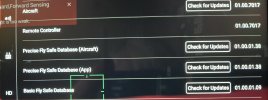
I have attached a shot of the firmware versions currently displayed in the About section. Perhaps you can see something in there that I have missed. When I press any of the Check for Update "buttons" they all reply with "Currently the latest version."
 

Attachments

  • Firmware Screen 1.jpg
    Firmware Screen 1.jpg
    920.1 KB · Views: 147
Last edited:
  • Like
Reactions: RodPad

Members online

No members online now.

Forum statistics

Threads
143,868
Messages
1,473,779
Members
105,969
Latest member
magicgat